GTA 6 vehicle mods
Find the right Mod Shop, check what a kit changes, and fit a winch on a compatible truck before taking it to a towable ATM.
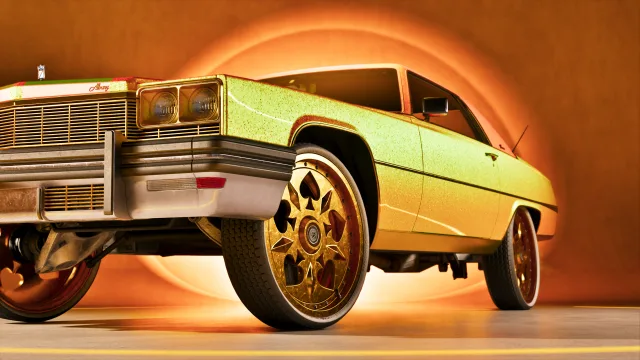
Rockstar’s Rideout Customs still shows a gold custom build. The parts menu you get depends on the vehicle and shop.
Find the right shop
- GTA Boss: Mod Shops and vehicle menus
Find a shop in the pause map
ReportedOpen Vehicles and choose Mod Shops. Select a shop to set a waypoint. Shop specialties show up in the list as you get access to more of Leonida.
- GTA Boss: Mod Shops and vehicle menus
Match the shop to the vehicle
ReportedCoastal Auto Care handles retro builds, Wasteland Off-Road handles off-road work, and Dirt Merchants works on bikes, according to GTA Boss. A specialty shop may turn away the wrong type of vehicle.
- PowerPyx: Mod Shop locations
Check your edition if a shop is missing
ReportedRockstar lists One-Eyed Willie’s and Rideout Customs among its Ultimate Edition material. PowerPyx lists One-Eyed Willie’s as edition-exclusive. Use the shops your in-game map shows.
Choose the upgrade
- Gamers Heroes: ATM towing walkthrough
Fit the towing attachment under Bodywork
ReportedDrive in with the truck you plan to use, then open Bodywork → Towing. Pick the winch or cable option if it is available for that truck. Check the menu again on any second truck you plan to drive.
- GTA Boss: Mod Shops and vehicle menus
Use Performance for individual parts
ReportedGTA Boss describes the difference between individual upgrades in Performance and bundled parts in Pro Builds. Check the changes on the preview screen before buying a whole kit.
- GTA Boss: Mod Shops and vehicle menus
Check what a build gives up
ReportedA build that improves off-road handling can make the same vehicle worse on asphalt. GTA Boss saw that tradeoff on a Cliffhanger kit. Read the bars for the roads you plan to drive.
- GTA Boss: Mod Shops and vehicle menus
Keep the vehicle before paying for upgrades
ReportedGTA Boss cautions that money spent on a car you don’t own may be lost. Start with a personal vehicle you intend to keep. Winch transfers between vehicles remain unverified.
- GTA Boss: Mod Shops and vehicle menus
Use Pay ’n’ Spray when you just need repairs
ReportedGTA Boss distinguishes the repair and respray shop from a parts shop. It reports the respray option may be locked when the vehicle has no Heat.
- TheGamer, GTA 6 Differences Between Paint Quality For Vehicle Customization
Pay ’n’ Spray vs. full mod shops: visible paint-quality difference
ReportedTheGamer (crediting @PapaRPG) points out a subtle finish difference between cheap resprays and proper customization: repainting at a Pay ’n’ Spray to shed Heat leaves a noticeably blistered, less reflective coat compared with springing for a full paint job at a dedicated vehicle customization garage.
KEEP READING
- Where to find notable cars in GTA 6
Look up reported car locations in Capri, Vice Beach, and Port Gellhorn, with a quick check before you try to keep a find.
- GTA 6 vehicles on the road and in the air
Look up aircraft and road vehicles in GTA 6, see what players report about fuel, and use the vehicle scan list as you explore Leonida by road or air.
- Your first hours in GTA 6
Set up the HUD, get your bearings in Leonida, and pick a few things to try on your first night in GTA 6. The guide leaves the story for you to discover.